An SDR based QRSS Grabber

About a year ago I purchased the NooElec Ham It Up v1.3 bare bones HF Up-converter (HFU) to use with their NeSDR SMArt dongle. The plan at that time was to get an SDR-based QRSS Grabber running online 24/7. For various reasons this never happened, and it’s only now that I have got the various bits and pieces all connected and working. The HFU is needed to extend the NeSDR frequency range down to the lower ham bands, for example the 80m, 40m and 30m bands.

My initial results were encouraging. With the various bits (NeSDR + HFU + 8 port USB hub) simply laying on the bench, I was getting good results, but the SDR was slowly drifting in frequency. The receive frequency moved about 60Hz overnight. Now for normal use, where you’re tuning across the band, listening to different QSO’s etc. this setup is fine and works really well, but if you’re monitoring QRSS signals 24/7 and the receiver drifts 60Hz that’s more than 25% of the whole QRSS band segment!

My immediate thought was to place all the bits in a box to protect against any draughts etc. that might be causing this problem. The results were not good… it made things worse! Checking against my 10MHz GPSDO I could see the line on Spectrum Lab tumbling at around 3Hz per minute! So was this due to the NeSDR dongle, the HFU or both? The NeSDR does run warm, so by putting all the bits in the confined space everything was warming up. I knew the specification of the NeSDR TCXO was 0.5ppm so my suspicions were with the HFU. To be sure I checked the NeSDR on its own and with the HFU switched in-line. As I expected the NeSDR on its own was basically “rock solid”, the trace on Spectrum Lab was straight, horizontal and didn’t appear to move. With the HFU switched in-line the trace was falling… so the 125MHz TCXO fitted to the HFU was suspect… or was it?

When I purchased the HFU I assumed that the board came with a TCXO fitted. On closer inspection and after revisiting the manufacturers specifications it soon became apparent that was a false assumption on my part… but not all was lost! Re-visiting the NooElec website I discovered that they offer a 125MHz 0.5PPM TCXO upgrade module. You can now also buy the “Plus” version that has the TCXO fitted as standard. Needless to say an order was placed for the TCXO module. 🙂

I tried attaching a large (6mm) nut to the can of the existing 125MHz crystal so that this would act as a “thermal mass” and potentially reduce drift due to minor changes in temperature. A thick piece of foam insulation was also added to the bottom of the board to try to stabilise the temperature surrounding the quartz crystal. Initial results showed that this was all helping but it was still not good enough for long-term monitoring of QRSS transmissions.

One week after ordering the TCXO an envelope dropped through the letter box. The installation of the TCXO was fairly straightforward; the original surface-mount crystal package is probably best removed with a hot-air tool and tweezers. I used a normal soldering iron with a home-made saddle-shaped bit that enabled me to heat all four connections at the same time. The only other thing that needed a few moments of careful thought was the orientation of the TCXO board.

This slideshow requires JavaScript.

Once the new TCXO was fitted, the next stage was to fit the foam insulation back in place and to run some tests to see how well the new setup worked. I used the 10MHz output from my GPSDO as the signal source and Spectrum Lab to view the frequency variation. The following photo shows the trace over a 10 minute period. I adjusted Spectrum Lab to have the trace running fairly close to the top of the screen to help show that the trace runs parallel to the border and is not drifting up or down in frequency.

My tests so far would suggest that what was already a very good SDR combination, one that would probably suit most people’s needs, is now even better with the frequency stability needed to run as a QRSS Grabber or work with other digital-modes.

What’s next…

  • To run a QRSS Grabber 24/7.
  • Having moved the QRSS Grabber receive hardware away from relying on an expensive multi-band transceiver to a relatively low cost SDR platform move the PC requirements to a Raspberry Pi 3.


Posted in Blog, QRSS / WSPR / QRP, SDR | Leave a comment

Not QRT

It’s been several months since my last blog post. Although little has happened as far as updates to my website / Blog there’s been a fair amount of activity going on behind the scenes. Some of this activity has been radio related and some to a “holiday of a lifetime” exploring parts of Australia and New Zealand, but the latter was without any radio! The break from hands-on radio and the hours spent travelling long-haul did allow me to think about what to do next, in terms of radio projects, equipment etc. It also resulted in the acquisition of a new transceiver on my return!  🙂

Hopefully over the coming weeks I will start to catch up on things and publish a number of blog posts detailing some of the things that have been happening.

Happy New Year and all the very best for 2018

Steve

Posted in Blog | Leave a comment

A new LDF4-50 Magnetic Loop Antenna

Having recently changed my car I realised this week that the diameter of my LDF5-50 Magnetic Loop (ML) is fractionally too big to fit in the back of my new car!!! So something needed to be done if I wanted to try some more /P operation. To try to reduce the size of the 5-50 loop would require a fair amount of work with a gas blow-lamp and most likely result in the ML no longer performing well on 40m

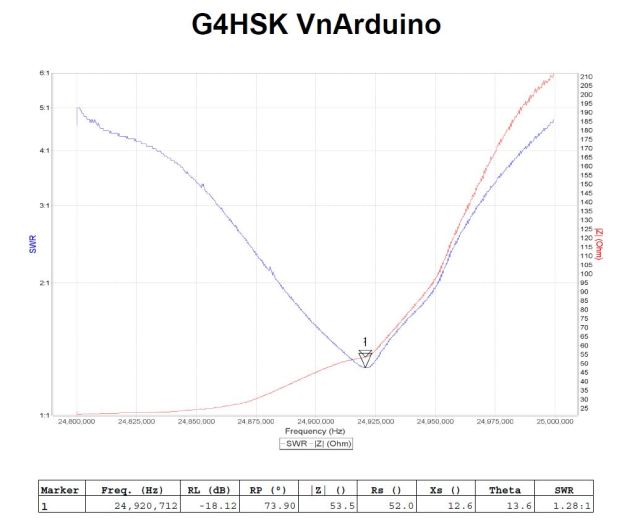
So after some rummaging around I found some old well-used LDF4-50 connectors and an off-cut of LDF4-50 cable. After running a few online calculations I decided to try a loop with a circumference of 8.5ft (~259cms) this should in theory cover 14MHz <> 30MHz albeit slightly sub-optimal for 20m.

The following two photos show the new ML being tested.

The tuning box has two N-type connectors and two variable capacitors. The capacitors are wired in parallel. The large value capacitor being used to set the band and the lower value for fine adjustment.

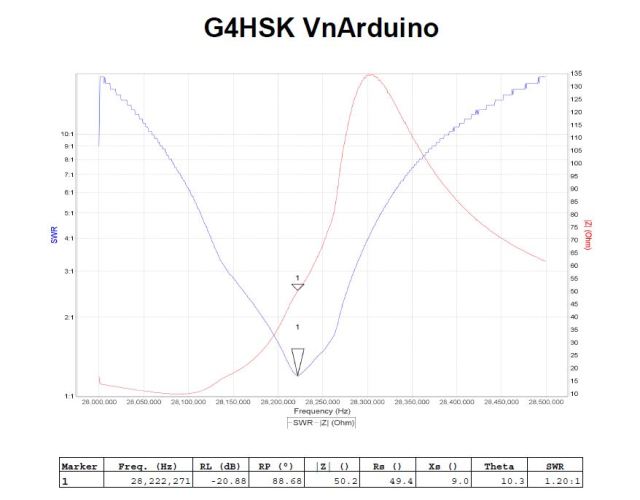
The initial measurements using my Arduino based Vector Network Analyser look very promising

This slideshow requires JavaScript.

Unlike its LDF5-50 ML this loop is constructed for low power operation (~5W) due to the small fairly close spaced capacitors.

How the ML will actually radiate remains to be seen… more to follow in the coming days. WIP  🙂


WARNING:  Because of the very high Q, some capacitors can arc over at power levels as low as 10 watts. Remember also that even with only a few watts of RF power, magnetic loop antennas produce very high voltages across the capacitor(s) and can cause nasty RF burns if touched while transmitting.

Posted in Blog, Magnetic Loops | Leave a comment

23cms VLNA Finally Installed at the Masthead

It’s been a long slow process but today I finally finished installing the G4DDK 23cms VLNA at the masthead. The extended timeline was partly due to some other improvements that needed to be done to the 2m EME setup and the availability of some reasonably priced right-angle N-type connectors for LDF4-50. With the assistance of Roger, EI8KN I was able to complete this initial work.

Ideally to minimise the losses the box housing the VLNA and TX/RX relay would be mounted right at the driven element (DE) on the Wimo 67 element long yagi. I know of one EME station that has done this but a lot of extra support was needed to keep the yagi boom straight and to not have the antenna break in strong winds.

My solution has been to mount the box on the support brace and have a 2.15m length of LDF4-50 between the relay and DE. To keep the losses to a minimum the LDF4-50 passes through the wall of the box and connects directly to the relay also the input to the VLNA connects directly to the relay using a high quality SMA<>N-type adapter. The calculated loss for this arrangement is ~0.6dB. I used a large (25mm) plastic cable-gland to weatherproof the entry of the LDF4-50 into the box. This has the advantage that the N-type connector will pass through the internal securing nut which allows the complete VLNA box to be removed from the mast for servicing.

This slideshow requires JavaScript.


The VLNA box is secured to the 15mm square section brace with two short lengths of aluminium angle that sit either side of the brace.

The system uses separate TX and RX feeders. Currently Ecoflex 15 is used for the loop round the rotator and down to the base of the mast. I’m not sure on the use of this foil+braid type of cable for this part of the system and only time will tell.

Posted in 23cms, Blog, EME, GHz_Bands | Leave a comment

23cms EME

The challenge to try EME on another band was made much easier when I heard about the SG-Lab TR1300 transverter. I could see that this could be fairly easily integrated into my existing 2m setup.

Things have and continue to move slowly on this new project. Having never operated before on any band above 70cms this is a whole new challenge especially with the intention of jumping straight to EME.

23cms EME Initials Worked

The table below shows initials (new stations) worked using the following setup(s):

  1. Single 67ele yagi + G4DDK VLNA –  K3 <> Anglian TVTR <> TR1300 <> 20W PA (8W at the antenna)

Table is “WIP”  🙂

______________________________________________________________

Initial  Date        Time    Call      Grid    Rpt    My Rpt Setup
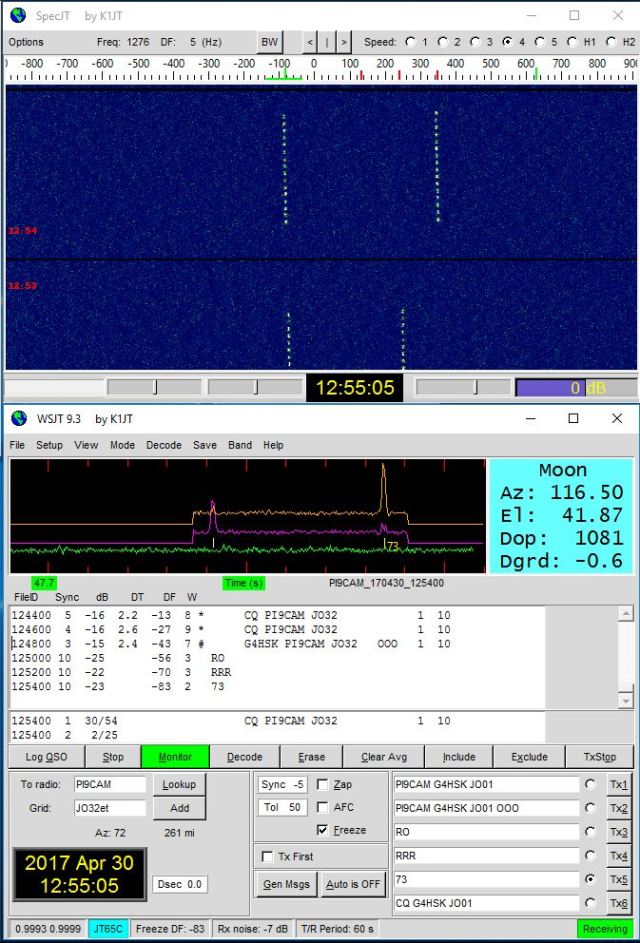
  1      30/04/2017  12:55   PI9CAM    JO32    -15             1
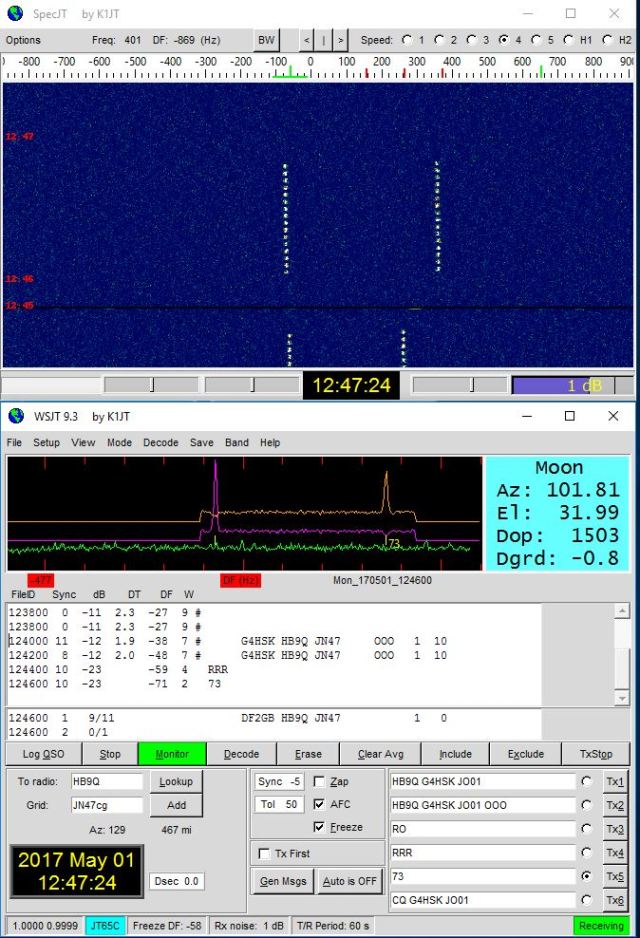
  2      01/05/2017  12:47   HB9Q      JN47    -12     -25     1
  3      12/08/2018  12:08   I1NDP     JN45    -21     -27     1


Posted in 23cms, Blog, EME, GHz_Bands | Leave a comment

Tidy-up of the 1.3GHz Transverter

Having completed the 1.3GHz PA and established that things work well with the transverter (TVTR) and PA located in the shack it was time to tidy things up a bit. I had a spare enclosure that matched the Anglian TVTR and 10MHz GPSDO so I decided that the SG-Lab TR1300, 1.3GHz BPF and control switching bits and pieces could all go together to form one neat unit.

The mast-head mounted G4DDK VLNA connects directly to a high quality antenna change-over relay that has separate coax feeds, receive (RX) and transmit (TX), that run to the shack. With this setup no antenna change-over relays are needed in the actual transverter enclosure.

The following photos show various stages of boxing it all up.

This slideshow requires JavaScript.

Those of you with an eye for detail may have noticed that I carefully spaced the RX and TX N-connectors so that the antenna change-over relay could be fitted directly onto the back  of the TVTR should it ever be used away from the shack, say out portable or whatever.

The 3.5mm stereo jack plug that the TR1300 uses for the PTT and sequencer connections is wired to the various Phono sockets on the back panel of the TVTR. Phono being the normal type of connector for this sort of function / connectivity in the HSK shack.

What’s next:

  • To drill the front-panel and fit an on / off switch! In my haste to get it all boxed up I forgot to do this!    🙂
Posted in 23cms, Blog, GHz_Bands | Leave a comment

A Fun Couple Of Days On 23cms

Having recently completed the ~20W PA for 23cms I was looking for some activity on the band to see what difference the extra few watts would make. Unfortunately I had just missed the monthly UKAC session. Reading the UKMicrowave Digest I came across a posting advising that PI9CAM would be active on 23cms Moonbounce (EME) on Sunday 30th May. 🙂

The very small setup here on 23cms is still suboptimal in terms of receive and it’s definitely QRPp (very low power in 23cms EME terms). However, I have been decoding several stations that were using ~3m dishes so PI9CAM with their 25m dish (i.e. BIG Ears 🙂 ) might just be workable… right?

It was around lunchtime that I noticed PI9CAM on the MAP65 display, they were -14dB with me. Checking on the HB9Q chatroom others were giving reports around -4dB or -5dB. I decided that I’d try calling, if nothing else it would be a good stress test of the system. 🙂 Then another challenge hit me, Doppler! What frequency do I set the Transmit to? Is my potential QSO partner where they think they should be? What’s their receive bandwidth etc. I tried calling for several periods without success but then the penny dropped, Doh… I’d applied the TX Doppler shift the wrong way!!! Once this was corrected I called again and after 2 or 3 periods of calling I got my first “OOO” report back!


I responded with “RO” and waited for a “RRR”, the trace was bright but it wasn’t “RRR”, I got an “RO”. So I responded with a second “RO” and then the magic “RRR” was returned which I followed with the customary “73”. My first 23cms EME Initial was in the log.

The challenge was on, HB9Q was my next goal. Unfortunately I didn’t see Dan on 23cms on Sunday. However, he was QRV the next day.

Having left the gear monitoring 23cms and 2m EME I spotted that Dan, HB9Q was active. I made sure I got the Doppler set correctly and called. After a few calls, Bingo! I decoded my second “OOO” and we completed quickly. Dan gave me a -25dB report which was a great surprise.


It was great to have two new random contacts in the EME log. It has to be said though that all credit goes to both of these outstanding EME stations, and my thanks go to the Team CAM, PI9CAM and Dan, HB9Q. I’m certain my next EME contact on this band will not be quite so easy, but then that’s the challenge and the fun.  😉  I’m totally hooked now on the GHz bands and would encourage anyone to give 23cms and above a go.

My setup was a single 67 element yagi, G4DDK VLNA, 20W PA  (~8W at the antenna), SG-Lab TR1300 TVTR >> Anglian TVTR >> K3 and FCDPP + Linrad + MAP65

For interest here are a few other screen captures of various stations decoded via the Moon.

This slideshow requires JavaScript.


What’s next? The VLNA needs to be moved as close as possible to the antenna driven-element and the number of N-type connectors reduced plus more power on TX!!!

Posted in 23cms, Blog, EME, GHz_Bands | Leave a comment

1.3GHz 20W PA

My plan to be QRV on 23cms EME continues to move forward albeit at a rather different pace to what I’d originally envisaged. After a period of many weeks where little progress was made I’ve focussed my mind on getting a small 23cms PA going, possibly inspired by my recent visit to the Martlesham Microwave Round Table 🙂

My goal is to have somewhere in the region of 120W at the antenna from a SSPA. To overcome the inherent losses in a long coax cable run on 23cms the SSPA needs to be as close to the antenna system as possible. The SG-Lab TR1300 produces approximately 2.5W output so depending on where the transverter and PA are eventually situated another small SSPA is possibly going to be needed.

I was very fortunate to be offered a complete kit of parts for a ~20W PA that’s based on a Mitsubishi M57762 Power Amplifier module. I initially thought that I would combine this new PA with the TR1300 in one neat enclosure but decided it would be better to keep things modular so there was flexibility in what went where, and for ease of repair should things fail.

The following photos show the build stages of this small PA.

This slideshow requires JavaScript.

Those of you that have a keen eye may have noticed that the original kit came complete with a two-part enclosure. But like the majority of my smaller projects this PA has ended up in my preferred aluminium die-cast box. 🙂

The construction centred mainly on metal-bashing, not the part I generally enjoy. Strangely though this project was different, I really enjoyed the drilling and tapping of the heatsink, something I’d not done for probably 30+ years! Maybe one day I will find some enjoyment in spray-painting and my projects will not have the natural aluminium look finish… 😉

So far the PA is working as expected, with an attenuator between the TR1300 and the input to of the PA both sit side-by-side in the shack and the PA produces 18 – 20W (JT65). The TX coax run to the EME antennas (2m & 23cms) has a loss of ~3.6dB at 23cms so should I choose to place this small PA at the antennas there should still be sufficient drive from the shack to produce ~18W output.

The next step is to tidy up the transverter, band pass filter and switching.

Posted in 23cms, Blog, EME, GHz_Bands | Leave a comment

An Arduino Based Vector Network Analyser

My first opportunity to experience first-hand the advantages of owning a network analyser  was when Charlie, M0PZT kindly brought his MFJ-259 Analyser over and we took a look at a Magnetic Loop antenna that I’d constructed. It was suddenly so very easy to see the tuning (frequency) range and SWR / Resistance measurements. As a result of this I started to look at the various “Analysers” that were on the market and it soon became clear that there were so many different options available and you could spend a lot of money if you bought an “off the shelf” unit.

The quandary I had was that my main interests are in the VHF-and-up bands, I wanted all the bells and whistles that an analyser could offer including the ability to do transmission line measurements etc. it needed to be portable (i.e. work without a PC) but also be able to produce all the fancy graphs when needed. Oh yes, and I didn’t want to spend a lot of money 🙂 The result of all of this was that I did spend my radio funds, but on VHF and above kit, and just kept looking for the ideal analyser… needless to say I couldn’t find anything, but things changed a few months back when I learnt about F4GOH’s VnArduino project.

Having read the write-up on the VnArduino I decided that it seemed to offer what I wanted, certainly in functionality, albeit its upper frequency limit is ~60MHz. Boards were available on eBay and the write-up suggested it would cost somewhere in the region of £60.00 to build. Like a lot of projects this figure invariably varies depending on the size and quality of your “junk / spares” box. 🙂

The various parts were all readily available, but like most things, if you’re willing to do your research and perhaps do a group buy, savings can be made. The parts were sourced over a period of several weeks and once construction was started everything went together quite quickly. It’s a fairly straightforward build, if you’re comfortable working with SMDs. In saying that, my unit didn’t quite work as it should first time.

There were three issues, but all fairly minor:

  1. The LCD display wasn’t working correctly. This was the first project that I had built using the I2C interface and it turned out that the LCD module I had purchased needed a change to the Arduino sketch (software) to make it work. The software expected an address of 0x27 which agreed with the seller’s description, but the display was actually 0x3F   The LCD config line needed changing to: LiquidCrystal_I2C lcd(0x3F, 2, 1, 0, 4, 5, 6, 7, 3, POSITIVE);
  2. Nothing happened when turning the rotary encoder. The one I used was faulty! Fortunately I had a second one (from the same supplier) and swapping them over fixed that problem.
  3. When scrolling through the menus each rotary encoder detent results in a jump of two options in the menu! To move just one step you need to turn the knob very slightly until the menu option changes. I changed the rotary encoder to a better quality device from a different manufacturer and found that the menu problem was fixed but the frequency would only change in one direction, you could increase the frequency but not come back down in frequency. I’ve been told that this is most likely due to bounce and more filtering is needed. For now I’ve swapped back and everything works fine apart from the slight double-hop quirk.

Here’s a photo of the partially completed board:

vnarduino_000

The most tricky part (for me) was fitting the AD8302, this has 14 closely spaced legs that need soldering in place. Once that’s done the rest is plain sailing 🙂 I chose to fit the hardest part first, certainly before assembling any of the parts on the top of the board.

I decided to house the various parts in what has become my standard enclosure for most of my projects… an Eddystone die-cast box.

vnarduino_012

I added three additional switches, one toggle and two momentary push-to-make button switches. The toggle switch is to turn the unit off when powered from an external battery source and the push buttons are to reset the Arduino and select the menu option (wired in parallel to the rotary encoder switch.)

Here’s the final unit in operation:

vnarduino_015

The VnArduino works really well in stand-alone mode. I simply power the unit from a low-cost USB power pack that’s normally used for recharging mobile phones etc. The Arduino software has a fairly intuitive menu that is navigated using the rotary and push switch functions of the rotary encoder. The standard amateur bands between 1 – 60MHz are predefined in the software and it’s very easy to check how an antenna performs on a particular band.

Where things get very interesting and the analyser becomes an even better tool is when it is used with a PC that is running the DL2SBA vna/J software. This software allows you to do so many more things and presents the results in graphical format that can be exported in various different file formats, e.g. PDF, CSV etc.

The following photos show some of the results obtained when checking my W3DZZ dipole and home made  MagLoop antennas:

g4hsk_80m_sweep_of_w3dzz

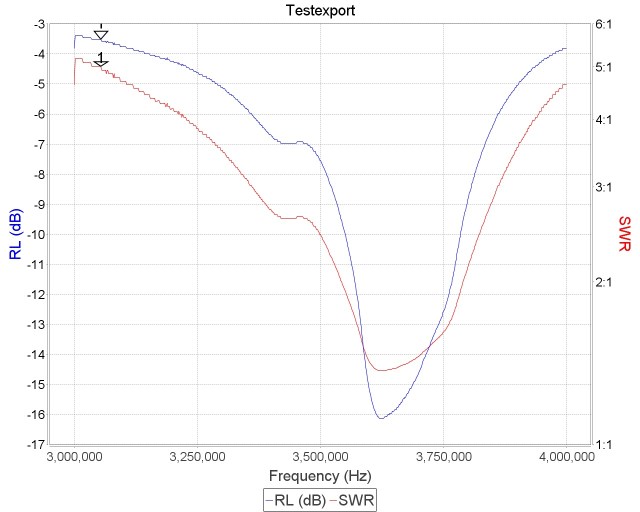
3 – 4MHz sweep of W3DZZ trapped dipole

VNA_Magnetic_Loop_10M_Sweep_a

Homebrew MagLoop on 10m

VNA_Magnetic_Loop_12M_Sweep_a

Homebrew MagLoop on 12m

Unlike the MFJ-259 the VnArduino is a two-port device and is able to do transmission line measurements. So it’s useful for checking such things as Low Pass Filters (LPFs), Quartz crystals and filters. The following photos show the characteristics of some LPFs that I constructed for use with the Ultimate3 QRSS beacon.

40m Low Pass Filter

80m Low Pass Filter

The VnArduino has proven to be very useful in checking the additional filters for the Ultimate3 QRSS beacon and some recent modifications made to a MagLoop antenna. I’m looking forward to the better weather when I can really start to experiment and perhaps improve the current HF antennas here at the home QTH and when out operating portable.

What’s next:

  • To resolve the issue of the “double-hop” when using the rotary encoder to scroll through the menus.
  • To test the Bluetooth functionality with a cheap Android Tablet.

Acknowledgements:

F4GOH:          For the VnArduino project and software.

DL2SBA:        For the excellent vna/J software


Posted in Arduino, Blog | Leave a comment

1.3GHz Transverter – separate TX / RX ports

The SG-Lab TR1300 transverter continues to impress me. My current setup on 1.3GHz is the TR1300 with Sam, G4DDK’s VLNA and a single 67 element long yagi. The Anglian transverter is used on the 144MHz IF side, both transverters are locked to a 10MHz GPSDO. Unless EME conditions are really poor, it’s unusual for the ON0EME  beacon not to be seen on the screen, albeit rather faint at times.

The TR1300 can be used with a single (SMA) antenna connection, with internal changeover switching, or by removing a SMD zero ohm resistor separate receive and transmit antenna connections can be used. To connect the VLNA and prepare for the planned SSPA I did the modification and split the antenna connections. The antenna switching is now done by an external 12V high power relay that offers ~80dB of isolation and will easily handle the planned 150W power output.

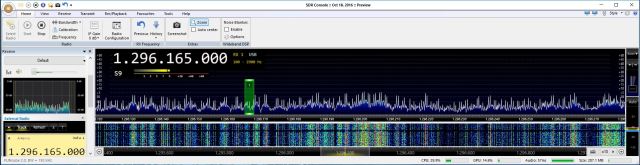
The one observation after doing this modification is that the receive path no longer has the same filtering on the input. Now this wasn’t an issue when the antenna was pointing up at The Moon but with the antenna horizontal in certain directions the band was unusable due to interference / intermodulation from strong out of band signals, due I suspect to mobile phone transmissions originating from a local base station. A search on the Internet / Microwave forums suggests this to be a fairly common problem when operating on 1.3GHz with nearby mobile phone / TV transmitters. Some additional external filtering was going to be needed.

Constructing an interdigital filter was considered, but whilst the mechanical side was doable with my (limited) workshop facilities I certainly would not have the necessary test gear to tune and measure the performance of the filter. Another local station had been experiencing a similar issue and solved it by using the KUHNE Electronic 1296 interdigital filter (MKU BPF 1.3) . This sounded as if it might work for me. So for Christmas my XYL  bought me a MKU BPF 1.3 filter … 🙂

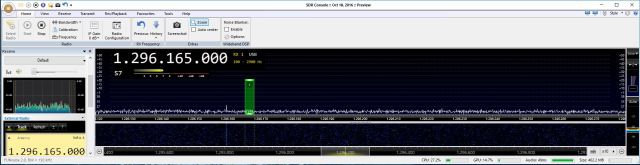
The filter is now installed (between the VLNA and transverter RX port) and the results have met my expectations.  There is no obvious interference when looking at the band on an SDR display… and I can still “see” the ON0EME EME beacon 🙂

The following two photos show the SDR display and give an indication of the band before and after the filter was installed.

23cms before filter: heading-127deg

23cms before filter, heading-127deg


23cms after fitting filter, heading-127deg

23cms after fitting filter, heading-127deg

Posted in 23cms, Blog, EME, GHz_Bands | Leave a comment